

OKHttp
导入依赖
xml
<dependency>
    <groupId>com.squareup.okhttp3</groupId>
    <artifactId>okhttp</artifactId>
    <version>${okhttp.version}</version>
</dependency>
请求流程
| 组件 | 描述 |
|---|---|
OkHttpClient | 一个线程安全的客户端实例(类似浏览器)。在实际在应用中应该全局唯一,通常创建为单例模式。 |
Request | 表示一次 HTTP 请求。可以设置请求方式、URL、Header及消息体。通常工厂 new Request.Builder()...build() 进行构建。 |
Call | 用于发送 HTTP 请求并处理响应。Call 接口定义了一个 execute() 方法和一个 enqueue() 方法,分别用于同步执行和异步执行 HTTP 请求。 |
Response | HTTP 响应结果。 |
创建OKHHttpClient客户端
java
@Configuration
public class OkHttpClientConfig {
    //向容器中创建OkHttpClient
    @Bean
    public OkHttpClient okHttpClient() {
        return new OkHttpClient();

        //通过newBuilder可以在创建之前,设置一些默认的配置
        /*
            new OkHttpClient().newBuilder()
                .connectTimeout(3, TimeUnit.SECONDS) // 设置超时时间
                .addInterceptor(...) // 添加拦截器
                .dns(...)  // 设置DNS
                .build();
        */
    }
}
创建请求对象
设置URL、Header信息、请求体信息
java
Request request = new Request.Builder()
	.url("...")
	.addHeader("...", "...")
	.get()
	.build();
使用OKHHttpClient执行请求
java
//通过@Autowired的注入OKHttpClient,调用newCall执行方法
Call call = CLIENT.newCall(request);
获取到 Response 对象
同步请求:
java
try (Response execute = call.execute()) {
    if (execute.isSuccessful()) { // 请求执行成功
        // HTTP Code
        int code = execute.code();

        // 响应体
        ResponseBody response = execute.body();
        if (response != null) {
            // 消息长度
            long length = response.contentLength();

            // 消息媒体类型
            MediaType mediaType = response.contentType();

            // 可以使用下面任意一种方式获取消息体

            String string = response.string(); // 字符串
 mmmx,c           byte[] bytes = response.bytes(); // 字节数组
            InputStream in = response.byteStream(); // 字节流
            Reader reader = response.charStream(); // 字符流
        }
    }
} catch (Exception e) {
    // handler exception
}
异步请求:
java
call.enqueue(new Callback() {
    @Override
    public void onFailure(@NotNull Call call, @NotNull IOException e) {
        LOGGER.error("request fail: {}, exception: {}", call.request(), e.getMessage(), e);
    }

    @Override
    public void onResponse(@NotNull Call call, @NotNull Response response) throws IOException {
        if (response.isSuccessful()) {
            // 与同步请求一样,继续处理 response        } else {
            // 请求失败处理
        }
    }
});
释放资源
Response execute = call.execute()写在try中可以自动释放资源
常见请求
GET请求
java
Request request = new Request.Builder()
        .url("http://localhost:8080/user?id=1")
        .addHeader("...", "...")
        .get()//表示是get请求
        .build();

Call call = CLIENT.newCall(request);
文件下载
文件下载就是普通的 GET 请求,唯一的区别就是注意响应数据的处理。进行文件下载时,我们应该获取响应数据的二进制流数据而不是文本字符串,然后再根据具体的媒体进行进行响应的处理即可:
java
Request request = new Request.Builder()
        .url("http://localhost:8080/download/1")
        .addHeader("...", "...")
        .get()
        .build();

// 以同步请求为例
Response response = CLIENT.newCall(request).execute();

int code = response.code();  // 状态码
Protocol protocol = response.protocol(); // 请求协议
ResponseBody body = response.body();  // 响应体对象

// 注意这里
InputStream inputStream = body.byteStream(); // 二进制流数据
MediaType mediaType = body.contentType(); // 二进制流的媒体类型
POST请求
java
Request request = new Request.Builder()
	.url("http://localhost:8080/")
	.addHeader("...", "...")
	.post(RequestBody)//表示POST请求,且将RequestBody作为请求体接受
	.build();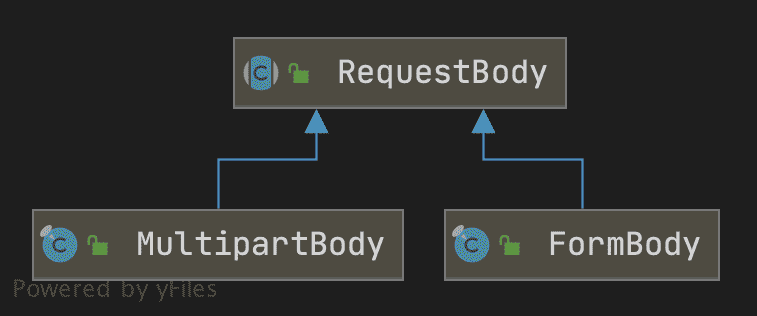
RequestBody
用于发送简单请求,如JSON作为请求体数据
java
//创建RequestBody的方法
public static RequestBody create(final MediaType contentType, final byte[] content);
public static RequestBody create(final MediaType contentType, final byte[] content, final int offset, final int byteCount);
public static RequestBody create(final MediaType contentType, final ByteString content);
public static RequestBody create(final MediaType contentType, final byte[] content);
public static RequestBody create(final MediaType contentType, final byte[] content, final int offset, final int byteCount);
public static RequestBody create(final MediaType contentType, final File file);


//对象
User user = new User();
user.setUsername("HanMeimei");
user.setAge(18);
//写为JSON字符串
ObjectMapper objectMapper = new ObjectMapper();
String plaintext = objectMapper.writeValueAsString(user);
//创建RequestBody
RequestBody requestBody = RequestBody.create(MediaType.parse("application/json;charset=utf-8"), plaintext);

//传入构建request
Request request = new Request.Builder()
    	.url("http://localhost:8080/")
    	.addHeader("...", "...")
    	.post(requestBody) // 请求体数据
    	.build();

//发送请求
Call call = CLIENT.newCall(request);
MultipartBody(文件上传)
java
// 文件
File file = new File("/path/RequestBody.png");
String fileName = file.getName();

MultipartBody multipartBody = new MultipartBody.Builder()
        // 后台接收的 key, 文件名称, 文件对象
        .addFormDataPart("file", fileName, RequestBody.create(MediaType.parse("image/png"), file))
        .build();

Request request = new Request.Builder()
        .url("http://localhost:8080/upload")
        .post(multipartBody)
        .build();

Call call = CLIENT.newCall(request);
FormBody
用于Form 表单数据
java
//FormBody内部配置了一个对应的application/x-www-form-urlencoded,所以无序再配置
//private static final MediaType CONTENT_TYPE = MediaType.get("application/x-www-form-urlencoded");
FormBody requestBody = new FormBody.Builder()
        .add("username", "HanMeimei")
        .addEncoded("charset", "UTF-8")
        .build();

// 请求
Request request = new Request.Builder()
        .url("http://localhost:8080/")
        .addHeader("...", "...")
        .post(requestBody)
        .build();

Call call = CLIENT.newCall(request);