

Vue3
项目工程
工程创建
基于 vue-cli 创建
点击查看官方文档
备注:目前
vue-cli已处于维护模式,官方推荐基于Vite创建项目。
## 查看@vue/cli版本,确保@vue/cli版本在4.5.0以上
vue --version

## 安装或者升级你的@vue/cli
npm install -g @vue/cli

## 执行创建命令
vue create vue_test

##  随后选择3.x
##  Choose a version of Vue.js that you want to start the project with (Use arrow keys)
##  > 3.x
##    2.x

## 启动
cd vue_test
npm run serve
基于 vite 创建
## 1.创建命令
npm create vue@latest

## 2.具体配置
## 配置项目名称
√ Project name: vue3_test
## 是否添加TypeScript支持
√ Add TypeScript?  Yes
## 是否添加JSX支持
## javascript xml,表示在 JS 代码中书写 HTML 结构
√ Add JSX Support?  No
## 是否添加路由环境
√ Add Vue Router for Single Page Application development?  No
## 是否添加pinia环境
√ Add Pinia for state management?  No
## 是否添加单元测试
√ Add Vitest for Unit Testing?  No
## 是否添加端到端测试方案
√ Add an End-to-End Testing Solution? » No
## 是否添加ESLint语法检查
√ Add ESLint for code quality?  Yes
## 是否添加Prettiert代码格式化
√ Add Prettier for code formatting?  No
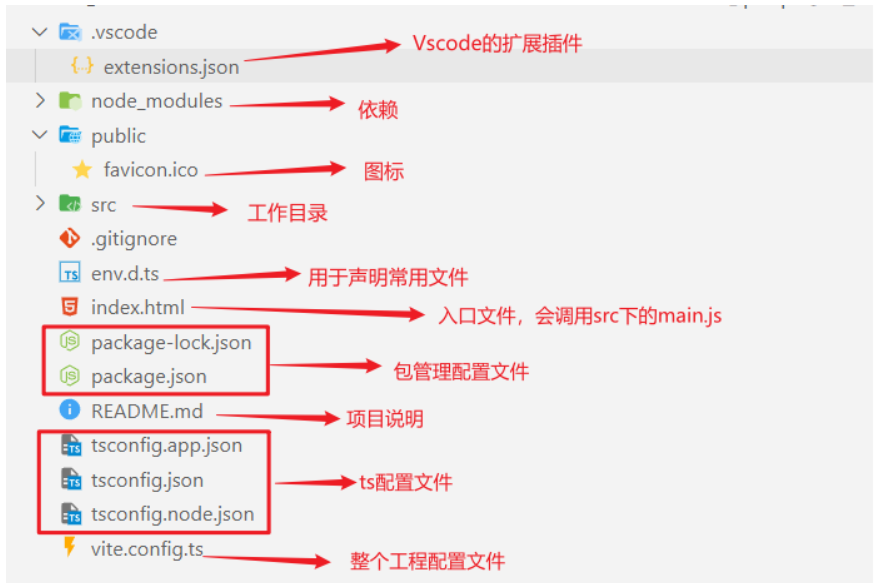
工程架构
<!--html代码编写地方-->
<template>

</template>

<!--js或者ts代码编写地方-->
<script lang="ts" setup name="App">

</script>

<!--css样式编写地方,scope限制样式仅仅在当前vue文件中生效-->
<style scope>

</style>
Vue3核心语法
OptionsAPI与CompositionAPI
Options API(Vue2)
Options类型的 API,数据、方法、计算属性等,是分散在:data、methods、computed中的,若想新增或者修改一个需求,就需要分别修改:data、methods、computed,不便于维护和复用。
Composition API(Vue3)
可以用函数的方式,更加优雅的组织代码,让相关功能的代码更加有序的组织在一起。
<div> <img src="vue3_image/1696662249851-db6403a1-acb5-481a-88e0-e1e34d2ef53a.gif" alt="3.gif" style="height:300px;border-radius:10px;display: inline-block;margin-right: 30%" /> <img src="vue3_image/1696662200734-1bad8249-d7a2-423e-a3c3-ab4c110628be.gif" alt="2.gif" style="zoom:70%;border-radius:20px;display: inline-block;" /> </div>
setup
基本使用
若返回一个对象:则对象中的:属性、方法等,在模板中均可以直接使用。
<template>
  <div class="person">
    <!--使用setup中返回的name和函数-->
    <h2>姓名:{{name}}</h2>
    <button @click="showTel">点我查看联系方式</button>
  </div>
</template>

<script lang="ts">
 // 导出,其他js文件中通过import Person from './Person.vue'可以导入
  export default {
    // 组件名
    name:'Person',
    setup(){
      let name = '张三'
      let tel = '13888888888'

      function showTel(){
        alert(tel)
      }

      // 返回一个对象,对象中的内容,模板中可以直接使用
      return {name,,showTel}
    }
  }
</script>若返回一个函数:则可以自定义渲染内容。
//你好啊将会直接展示到浏览器页面上
setup(){
  return ()=> '你好啊!'
}。
setup 语法糖
独立setup
独立setup,通过一个script标签,去指定组件名字。
<template>
  <div class="person">
    <h2>姓名:{{name}}</h2>
    <button @click="showTel">点我查看联系方式</button>
  </div>
</template>


<script lang="ts">
  export default {
    name:'Person',
  }
</script>

<!-- 下面的写法是setup语法糖 -->
<script setup lang="ts">
  let name = '张三'
  let tel = '13888888888'

  function showTel(){
    alert(tel)
  }
</script>
vite插件简化
npm i vite-plugin-vue-setup-extend -Dvite.config.ts
import { defineConfig } from 'vite'
import VueSetupExtend from 'vite-plugin-vue-setup-extend'

export default defineConfig({
  plugins: [ VueSetupExtend() ]
})


//完整配置文件
import { fileURLToPath, URL } from 'node:url'

import { defineConfig } from 'vite'
import vue from '@vitejs/plugin-vue'
import VueSetupExtend from 'vite-plugin-vue-setup-extend'


// https://vitejs.dev/config/
export default defineConfig({
  plugins: [
    vue(),
    VueSetupExtend()
  ],
  resolve: {
    alias: {
      '@': fileURLToPath(new URL('./src', import.meta.url))
    }
  }
})- 第三步:
<script setup lang="ts" name="Person">、
<template>
  <div>
    {{name}}
  </div>
</template>

<!-- 下面的写法是setup语法糖 -->
<script setup lang="ts" name="xxx">
	let name= 'vue3'
</script>
响应式数据
ref与reactive
ref用来定义:基本类型数据、对象类型数据;reactive用来定义:对象类型数据。
ref在JS中操作数据需要:xxx.value,但模板中不需要.value。而reactive均不需要.value
<template>
	<!--ref-->
    <div>
        <p>{{ sum }}</p>
      	<!--不需要.value-->
        <button @click="sumAdd">sum ++</button>
    </div>

	<!--reactive-->
    <div class="person">
        <h2>测试:{{obj.a.b.c.d}}</h2>
        <button @click="test">测试</button>
    </div>
</template>

<script lang="ts" setup name="App">
    import {ref,reactive} from "vue"

    //ref
    let sum=ref(1)
    function sumAdd(){
        //需要.value
        sum.value++
    }

    //reactive
    let obj = reactive({
          a:{
            b:{
              c:666
            }
          }
        })

    function test(){
        obj.a.b.c = 999
    }
</script>reactive重新分配一个新对象,会失去响应式(可以使用Object.assign去整体替换)。
<script lang="ts" setup name="Person">
  import {ref,reactive} from 'vue'

  let car1 = reactive({brand:'奔驰',price:100})
  let car2 = ref({brand:'奔驰',price:100})

  //reactive
  function changeCar(){
      //失去响应式
      car1 = {brand:'奥拓',price:1}

      //失去响应式
      car1 = reactive({brand:'奥拓',price:1})

      //通过Object.assign分配可以保留其响应式
      Object.assign(car1,{brand:'奥拓',price:1})
 }

 function changeSum(){
      //失去响应式
      car2=ref({brand:'奥拓',price:1})

      //通过.value赋值,不会失去响应式
      car2.value={brand:'奥拓',price:1}
 }
</script>
- 若需要一个基本类型的响应式数据,必须使用
ref。- 若需要一个响应式对象,层级不深,
ref、reactive都可以。- 若需要一个响应式对象,且层级较深,推荐使用
reactive。
toRefs 与 toRef
将一个响应式对象中的属性,转换为ref对象,依旧保持其响应式。
toRef用于单个属性转换,而toRefs可以批量转换
<script lang="ts" setup name="Person">
  import {ref,reactive,toRefs,toRef} from 'vue'

  // 数据
  let person = reactive({name:'张三', age:18, gender:'男'})

  // 将person对象中的n个属性批量取出,且依然保持响应式的能力,解析出name和gender
  let {name,gender} =  toRefs(person)

  // 通过toRef将person对象中的age属性取出,且依然保持响应式的能力
  let age = toRef(person,'age')
</script>
计算属性computed
通过现有属性计算出属性
只读
fullName不能直接修改,因为其是只读的
<img src="vue3_image/computed.gif" style="zoom:20%;margin-left:35%" />
<template>
  <div class="person">
    姓:<input type="text" v-model="firstName"> <br>
    名:<input type="text" v-model="lastName"> <br>
    全名:<span>{{fullName}}</span> <br>
  </div>
</template>

<script setup lang="ts" name="App">
import {ref,computed} from 'vue'

let firstName = ref('zhang')
let lastName = ref('san')

// 通过调用这个函数,计算出fullName
 let fullName = computed(()=>{
  return firstName.value + '-' + lastName.value
})

</script>
可读可写
<template>
  <div class="person">
    姓:<input type="text" v-model="firstName"> <br>
    名:<input type="text" v-model="lastName"> <br>
    全名:<span>{{fullName}}</span> <br>
    <button @click="changeFullName">全名改为:li-si</button>
  </div>
</template>

<script setup lang="ts" name="App">
import {ref,computed} from 'vue'

let firstName = ref('zhang')
let lastName = ref('san')

get:这是一个函数,当你访问这个  属性时,它会被调用。这个函数应该返回一个值,这个值就是这个 computed 属性的值。这个函数的结果会被缓存,只有当它的依赖发生改变时,它才会被重新计算。
set:这是一个函数,当你试图修改这个 的值时,它会被调用。这个函数接收一个参数,这个参数就是你试图设置的新值。你可以在这个函数中更新其他的响应式属性,从而间接地更新这个 computed 属性的值

// 计算属性——既读取又修改
let fullName = computed({

  // 访问computed属性时,通过get函数计算出其值
  get(){
    return firstName.value + '-' + lastName.value
  },

  // 修改computed 属性时,调用set函数,val为fullName将要修改的值
  set(val){
    console.log('有人修改了fullName',val)
    firstName.value = val.split('-')[0]
    lastName.value = val.split('-')[1]
  }
})

function changeFullName(){
  fullName.value = 'li-si'
}
</script>
数据监控
watch
监视响应式数据的变化
监视基本类型
监视ref定义的基本类型数据,监视的是其value值的改变。
<script lang="ts" setup name="Person">
  import {ref,watch} from 'vue'
  // 数据
  let sum = ref(0)

  // 当sum发生变化,将会调用传入的函数,newValue,oldValue为新的值和修改前的值。
  // watch 函数的返回值 stopWatch函数,当调用它时,会停止对 sum 的监视。
  const stopWatch = watch(sum,(newValue,oldValue)=>{
    console.log('sum变化了',newValue,oldValue)
    if(newValue >= 10){
      stopWatch()
    }
  })
</script>
监视ref对象类型
监视ref定义的对象类型数据,监视的是对象的地址值,若想监视对象内部的数据,要手动开启深度监视。
若修改的是
ref定义的对象中的属性,newValue和oldValue都是新值,因为它们是同一个对象。且未开启深度监视时,watch函数不会被调用若修改整个
ref定义的对象,newValue是新值,oldValue是旧值,因为不是同一个对象了。
<script lang="ts" setup name="Person">
  import {ref,watch} from 'vue'
  // 数据
  let person = ref({
    name:'张三',
    age:18
  })

  //监视person的地址值,只有地址变化才会调用
  watch(person,(newValue,oldValue)=>{
     console.log('person变化了',newValue,oldValue)
  },{deep:true})


  //开启深度监视,任一属性变化时就会调用(地址变换也会调用)
  watch(person,(newValue,oldValue)=>{
    console.log('person变化了',newValue,oldValue)
  },{deep:true})
</script>
监视reactive对象类型
监视reactive定义的对象类型数据,且默认开启了深度监视。
<script lang="ts" setup name="Person">
  import {reactive,watch} from 'vue'
  // 数据
  let person = reactive({
    name:'张三',
    age:18
  })

  // 监视reactive定义的对象类型数据,且默认是开启深度监视的,任一属性变化时就会调用(地址变换也会调用)
  watch(person,(newValue,oldValue)=>{
    console.log('person变化了',newValue,oldValue)
  })
</script>
监视ref或reactive对象类型某个属性
监视ref或reactive定义的【对象类型】数据中的某个属性
- 若该属性值不是对象类型,需要写成函数形式。
- 若该属性值是依然是对象类型,可直接编写,也可写成函数(建议)。
<script lang="ts" setup name="Person">
  import {reactive,watch} from 'vue'

  // 数据
  let person = reactive({
    name:'张三',
    age:18,
    car:{
      c1:'奔驰',
      c2:'宝马'
    }
  })

  // 监视响应式对象中的某个属性,且该属性是基本类型的,要写成函数式
  watch(()=> person.name,(newValue,oldValue)=>{
    console.log('person.name变化了',newValue,oldValue)
  })

  // 监视响应式对象中的某个属性,且该属性是对象类型的,可以直接写,也能写函数,若需要关注对象内部,需要手动开启深度监视。
  watch(()=>person.car
      ,(newValue,oldValue)=>{
    console.log('person.car变化了',newValue,oldValue)
  },{deep:true})
</script>
监视多个数据
<script lang="ts" setup name="Person">
  import {reactive,watch} from 'vue'

  // 数据
  let person = reactive({
    name:'张三',
    age:18,
    car:{
      c1:'奔驰',
      c2:'宝马'
    }
  })

  // 监视,情况五:监视上述的多个数据
  watch([()=>person.name,()=>person.car],(newValue,oldValue)=>{
    console.log('person变化了',newValue,oldValue)
  },{deep:true})
</script>
watchEffect
watch:要明确指出监视的数据watchEffect:不用明确指出监视的数据(自动监视函数中使用的数据),一开始watchEffect就会执行一次。
<script lang="ts" setup name="Person">
  import {ref,watch,watchEffect} from 'vue'
  let temp = ref(0)
  let height = ref(0)

  // 用watch实现,需要明确的指出要监视:temp、height
  watch([temp,height],(value)=>{
    // 从value中获取最新的temp值、height值
    const [newTemp,newHeight] = value
    // 室温达到50℃,或水位达到20cm,立刻联系服务器
    if(newTemp >= 50 || newHeight >= 20){
      console.log('联系服务器')
    }
  })

  // 用watchEffect实现,不用
  const stopWtach = watchEffect(()=>{
    // 室温达到50℃,或水位达到20cm,立刻联系服务器
    if(temp.value >= 50 || height.value >= 20){
      console.log(document.getElementById('demo')?.innerText)
      console.log('联系服务器')
    }
    // 水温达到100,或水位达到50,取消监视
    if(temp.value === 100 || height.value === 50){
      console.log('清理了')
      stopWtach()
    }
  })
</script>
标签ref 属性
获取DOM节点
用在普通DOM标签上
<template>
  <div class="person">
    <h1 ref="title1">尚硅谷</h1>
  </div>
</template>

<script lang="ts" setup name="Person">
  import {ref} from 'vue'

  let title1 = ref()

  function showLog(){
    // 通过title1.value获得对应dom节点
    console.log(title1.value.innerHTML)

    // value中有许多属性
    /*
    textContent
    value
    style
    className
    attributes
    children
    parentElement
    */
  }
</script>
获取组件实例对象
用在组件标签上,获得组件向外部暴露的数据
<!-- 父组件App.vue -->
<template>
  <Person ref="ren"/>
</template>

<script lang="ts" setup name="App">
  import Person from './components/Person.vue'
  import {ref} from 'vue'

  let ren = ref()
  console.log(ren.value.name)
</script>


<!-- 子组件Person.vue中要使用defineExpose暴露内容 -->
<script lang="ts" setup name="Person">
  import {ref,defineExpose} from 'vue'
	// 数据
  let name = ref('张三')
  let age = ref(18)

  // 使用defineExpose将组件中的数据交给外部
  defineExpose({name,age})
</script>
生命周期
Vue3的生命周期创建阶段:
setup:初始化组件的状态和逻辑挂载阶段:
onBeforeMount:在组件挂载到 DOM 之前执行、onMounted(挂载完毕):在组件挂载到 DOM 之后执行更新阶段:
onBeforeUpdate:响应式数据已经变化,但 DOM 还没有更新、onUpdated(更新完毕):DOM 已经根据响应式数据的变化完成了更新卸载阶段:
onBeforeUnmount:组件还没有从 DOM 中移除,可以在这里执行一些清理操作、onUnmounted(卸载之前):组件已经从 DOM 中移除,可以在这里执行一些最终的清理操作。vue<script lang="ts" setup name="Person"> import { ref, onBeforeMount, onMounted, onBeforeUpdate, onUpdated, onBeforeUnmount, onUnmounted } from 'vue' onBeforeMount(()=>{ console.log('挂载之前') }) onMounted(()=>{ console.log('挂载完毕') }) onBeforeUpdate(()=>{ console.log('更新之前') }) onUpdated(()=>{ console.log('更新完毕') }) onBeforeUnmount(()=>{ console.log('卸载之前') }) onUnmounted(()=>{ console.log('卸载完毕') }) </script>
hook
将setup函数中使用的Composition API进行了封装,复用代码, 让setup中的逻辑更清楚易懂。在src目录下创建hooks文件夹,内部文件使用useXXX.ts格式进行命名
useDog.ts中内容如下:jsimport {reactive,onMounted} from 'vue' import axios,{AxiosError} from 'axios' export default function(){ //将数组[]转换为一个响应式数组,其类型为string[] let dogList = reactive<string[]>([]) // 方法,async关键字表示这个函数是异步的 async function getDog(){ try { // 发请求,await关键字用于等待结果的返回 let {data} = await axios.get('https://dog.ceo/api/breed/pembroke/images/random') // 维护数据 dogList.push(data.message) } catch (error) { // 处理错误 const err = <AxiosError>error console.log(err.message) } } // 挂载钩子 onMounted(()=>{ getDog() }) //向外部暴露数据 return {dogList,getDog} }组件中具体使用:
vue<script setup lang="ts"> import useSum from './hooks/useSum' import useDog from './hooks/useDog' let {sum,increment,decrement} = useSum() let {dogList,getDog} = useDog() </script>
路由
基本切换效果
路由组件通常存放在
pages或views文件夹,一般组件通常存放在components文件夹。通过点击导航,视觉效果上“消失” 了的路由组件,默认是被卸载掉的,需要的时候再去挂载。
route.ts
import {createRouter,createWebHistory} from 'vue-router'
import Home from '@/pages/Home.vue'
import News from '@/pages/News.vue'
import About from '@/pages/About.vue'

const router = createRouter({
    //路由器的工作模式
	history:createWebHistory(),
	routes:[
		{
			path:'/home',
			component:Home
		},
		{
			path:'/about',
			component:About
		}
	]
})
export default router
main.ts
// 引入createApp用于创建应用
import {createApp} from 'vue'
// 引入App根组件
import App from './App.vue'
import router from './router/index'

let app=createApp(App)
app.use(router)
app.mount('#app')
App.vue
<template>
  <div class="app">
    <h2 class="title">Vue路由测试</h2>
    <!-- 导航区 -->
    <div class="navigate">
      <RouterLink to="/home" active-class="active">首页</RouterLink>
      <RouterLink to="/news" active-class="active">新闻</RouterLink>
      <RouterLink to="/about" active-class="active">关于</RouterLink>
    </div>
    <!-- 展示区 -->
    <div class="main-content">
      <RouterView></RouterView>
    </div>
  </div>
</template>

<script lang="ts" setup name="App">
  import {RouterLink,RouterView} from 'vue-router'
</script>
路由器工作模式
hash模式
将前端路由的路径用井号 # 拼接在真实 url 后面的模式。当井号 # 后面的路径发生变化时,浏览器并不会重新发起请求,而是会触发 onhashchange 事件。
浏览器刷新时,URL并未发生改变(改变 hash 并没有真正地改变 url),所以页面路径还是之前的路径, nginx 也就不会拦截。
const router = createRouter({
	history:createWebHashHistory(), //hash模式
})
优点:兼容性更好,因为不需要服务器端处理路径。
缺点:
URL带有#不太美观,且在SEO优化方面相对较差。
history模式
允许开发者直接更改前端路由,即更新浏览器 URL 地址而不重新发起请求。
但是实际上URL是发生变换了,所以在对当前的页面进行刷新时,此时浏览器会重新发起请求。如果 nginx 没有匹配得到当前的 url ,就会出现 404 的页面。
const router = createRouter({
	history:createWebHistory(), //history模式
})
优点:
URL更加美观,不带有#,更接近传统的网站URL。缺点:后期项目上线,需要服务端配合处理路径问题,否则刷新会有
404错误。
路由使用
路由命名
给路由规则命名:
routes:[
  {
    name:'guanyu',
    path:'/about',
    component:About
  }
]
跳转路由:
router-link和RouterLink 及 router-view和RouterView是一样的
<!--简化前:需要写完整的路径(to的字符串写法) -->
<router-link to="/guanyu">跳转</router-link>

<!--简化后:直接通过名字跳转(to的对象写法配合name属性) -->
<router-link :to="{name:'guanyu'}">跳转</router-link>
嵌套路由
配置路由规则
const router = createRouter({
  history:createWebHistory(),
	routes:[
		{
			name:'xinwen',
			path:'/news',
			component:News,
			children:[
				{
					name:'xiang',
					path:'detail',
					component:Detail
				}
			]
		}
	]
})
export default router:<router-link to="/news/detail">xxxx</router-link>
<!-- 或 -->
<router-link :to="{path:'/news/detail'}">xxxx</router-link>路由传参
query参数
传递参数
vue<!-- 跳转并携带query参数(to的字符串写法) --> <router-link to="/news/detail?a=1&b=2&content=欢迎你"> 跳转 </router-link> <!-- 跳转并携带query参数(to的对象写法) --> <RouterLink :to="{ //name:'xiang', //用name也可以跳转 path:'/news/detail', query:{ id:news.id, title:news.title, content:news.content } }" > {{news.title}} </RouterLink>接收参数:
js//注意,是使用useRoute,不是useRouter import {useRoute} from 'vue-router' const route = useRoute() // 打印query参数 console.log(route.query) //数据存储在query内中 let {key,value}=useRoute().query
params参数
传递
params参数时,若使用to的对象写法,必须使用name配置项,不能用path。传递
params参数时,需要提前在规则中占位。ts{ name:'animal', path:'/animal/:key/:value', component:animal }params参数不允许传数组或者对象
传递参数
vue<!-- 跳转并携带params参数(to的字符串写法) --> <RouterLink :to="`/news/detail/001/新闻001/内容001`">{{news.title}}</RouterLink> <!-- 跳转并携带params参数(to的对象写法) --> <RouterLink :to="{ name:'xiang', //用name跳转 params:{ id:news.id, title:news.title, content:news.title } }" > {{news.title}} </RouterLink>接收参数:
jsimport {useRoute} from 'vue-router' const route = useRoute() // 打印params参数 console.log(route.params)
props配置
对象写法
<!--路由配置-->
{
  name: 'xiang',
  path: 'detail/:id/:title/:content',
  component: Detail,
  <!--此处将参数写死-->
  props: { a: 1, b: 2, c: 3 }
}

<!--子组件配置-->
<script setup>
    <!--从路由中定义的props中获取参数-->
	const props = defineProps(['a', 'b', 'c']);
</script>
布尔值写法
<!--路由配置-->
{
	path: '/detail/:id/:title/:content',
	name: 'detail',
	component: Detail,
	<!--从param中读取参数到props中,而不是写死-->
	props: true
}

<!--子组件配置-->
<script setup>
    <!--从路由中定义的props中获取参数-->
	const props = defineProps(['id', 'title', 'content']);
</script>

<!--父组件配置,通过param传递参数-->
<router-link :to="{ name: 'detail',params:{ id: '1', title: 'Sample', content: 'Content' } }">
    Go to Detail
</router-link>
函数写法
<!--路由配置-->
{
  name: 'xiang',
  path: 'detail/:id/:title/:content',
  component: Detail,
  <!--route.params或route.query获取参数-->
  props: route => {
      // 进行一些其他操作,例如数据转换或条件判断
      const id = parseInt(route.params.id, 10);
      const title = route.params.title.toUpperCase();
      const content = route.params.content.length > 10 ? route.params.content.substring(0, 10) + '...' : route.params.content;
      return { id, title, content };
    }
}

<!--子组件配置-->
<script setup>
	const props = defineProps(['foo', 'baz']);
</script>

<!--父组件配置-->
<router-link :to="{ name: 'xiang', params: { id: '1', title: 'title', content: 'content' }, query: { foo: 'bar', baz: 'qux' } }">
    Go to Detail
</router-link>
重定向
作用:将特定的路径,重新定向到已有路由。
{
    path:'/',
    redirect:'/about'
}
replace属性
浏览器的历史记录有两种写入方式:分别为push和replace:
push是追加历史记录(默认值),即可以前进和后退,默认模式。replace是替换当前记录,即不可以前进和后退。
<!--设置为replace模式-->
<RouterLink replace>News</RouterLink>
编程式导航
脱离了<RouteLink>进行组件间的跳转
import {useRoute,useRouter} from 'vue-router'

const route = useRoute()
const router = useRouter()

// route.query:获取当前路由的路由query参数

// route.parmas:获取当前路由的路由parmas参数

// router.push:使用push方式进行页面跳转

// router.replace:使用replace方式进行页面跳转


interface NewsInter {
    id:string,
        title:string,
            content:string
}

// 使用router进行跳转
function showNewsDetail(news:NewsInter){
    //和to的用法一致,to如何使用,router就可以如何使用
    router.replace({
        name:'xiang',
        query:{
            id:news.id,
            title:news.title,
            content:news.content
        }
    })
}
路由守卫
import {createRouter, createWebHistory} from 'vue-router'
import HomeView from '../views/HomeView.vue'

const router = createRouter({
    history: createWebHistory(import.meta.env.BASE_URL),
    routes: [
        {
            path: '/',
            name: 'home',
            component: HomeView
        }
    ]
})

// 在每次路由跳转前都会执行
router.beforeEach(async (to, from) => {
    console.log("守卫:to:", to)
    console.log("守卫:from:", from)
    if (to.fullPath === '/about') {
       return "/"
    }
})

export default router
组件通信
<img src="vue3_image/image-20231119185900990.png" alt="image-20231119185900990" style="zoom:60%;" />
props
props常用与 :父 ↔ 子。
父传子
父组件传递数据给子组件使用
父组件
<template>
  <div>
    <h1>Parent Component</h1>
    <Child :message="parentMessage" />
  </div>
</template>

<script setup>
import { ref } from 'vue';
import Child from './Child.vue';

const parentMessage = ref('Hello from Parent');
</script>
子组件
<template>
  <div>
    <h2>Child Component</h2>
    <!--直接使用defineProps声明的变量message,而不是props-->
    <p>{{ message }}</p>
  </div>
</template>

<script setup>
    //不限制数据类型
	const props = defineProps(['message']);

    // 第二种写法:接收+限制类型
    // defineProps<{list:Persons}>() 必须传
    // defineProps<{list?:Persons}>() 在list后添加?表示不必须传

    // 第三种写法:接收+限制类型+指定默认值+限制必要性
    // 第一个参数为限制接收类型和是否需要接收,第二参数通过函数返回默认值
    // let props = withDefaults(defineProps<{list?:Persons}>(),{
    // list:()=>[{id:'asdasg01',name:'小猪佩奇',age:18}]
</script>
子传父
父组件传递函数给子组件,子组件回调传入参数,修改父元素数据
父组件
<template>
  <div class="father">
      <h4>儿子给的玩具:{{ toy }}</h4>
      <Child :getToy="getToy"/>
  </div>
</template>

<script setup lang="ts" name="Father">
	import Child from './Child.vue'
	import { ref } from "vue";
	const toy = ref()

	// 方法
	function getToy(value:string){
		toy.value = value
	}
</script>
子组件
<template>
  <div class="child">
    <!--传入参数调用-->
	<button @click="getToy(toy)">玩具给父亲</button>
  </div>
</template>

<script setup lang="ts" name="Child">
	import { ref } from "vue";

	const toy = ref('奥特曼')
	defineProps(['getToy'])
</script>
自定义事件
自定义事件常用于:子 => 父。
父组件
<!--在父组件中,给子组件绑定自定义事件:-->
<Child @send-toy="saveToy"/>

<!--在父组件中的函数,当绑定事件被触发时将会调用-->
function saveToy(value:string){
    console.log('saveToy',value)
}
子组件
<!--在子组件声明绑定在自己身上的事件-->
const emit =  defineEmits(['send-toy'])

//手动触发
emit('send-toy',toy)

<!--点击触发-->
<button @click="emit('send-toy')">按钮</buttom>
mitt
mitt与消息订阅与发布功能类似,可以实现任意组件间通信。
安装
npm i mittemitter.ts
// 引入mitt
import mitt from "mitt";

// 创建emitter
const emitter = mitt()

// 创建并暴露mitt
export default emitter
接收数据的组件
绑定事件、同时在销毁前解绑事件
import emitter from "@/utils/emitter";
import { onUnmounted } from "vue";

// 绑定事件
emitter.on('send-toy',(value)=>{
  console.log('send-toy事件被触发',value)
})

onUnmounted(()=>{
  // 解绑事件
  emitter.off('send-toy')
})
提供数据的组件
在合适的时候触发事件
import emitter from "@/utils/emitter";

function sendToy(){
  // 触发事件
  emitter.emit('send-toy',toy.value)
}
注意这个重要的内置关系,总线依赖着这个内置关系
v-model
实现 父↔子 之间相互通信。
组件标签上的v-model的本质::moldeValue + update:modelValue事件。
<!-- 组件标签上使用v-model指令 -->
<AtguiguInput v-model="userName"/>

<!-- 组件标签上v-model的本质 -->
<AtguiguInput :modelValue="userName" @update:model-value="userName = $event"/>AtguiguInput组件中:
<template>
  <div class="box">
    <!--将接收的value值赋给input元素的value属性。 -->
	<!--给input元素绑定原生input事件,触发input事件时,进而触发update:model-value事件-->
    <input
       type="text"
       :value="modelValue"
       @input="emit('update:model-value',$event.target.value)"
    >
  </div>
</template>

<script setup lang="ts" name="AtguiguInput">
  // 接收props
  defineProps(['modelValue'])
  // 声明事件
  const emit = defineEmits(['update:model-value'])
</script>也可以更换value,例如改成abc
<!-- 也可以更换value,例如改成abc-->
<AtguiguInput v-model:abc="userName"/>

<!-- 上面代码的本质如下 -->
<AtguiguInput :abc="userName" @update:abc="userName = $event"/>AtguiguInput组件中:
<template>
  <div class="box">
    <input
       type="text"
       :value="abc"
       @input="emit('update:abc',$event.target.value)"
    >
  </div>
</template>

<script setup lang="ts" name="AtguiguInput">
  // 接收props
  defineProps(['abc'])
  // 声明事件
  const emit = defineEmits(['update:abc'])
</script>如果value可以更换,那么就可以在组件标签上多次使用v-model
<AtguiguInput v-model:abc="userName" v-model:xyz="password"/>$attrs
$attrs用于实现当前组件的父组件,向当前组件的子组件通信(祖→孙)。
$attrs是一个对象,包含所有父组件传入的标签属性,除去props中声明的属性(可以认为声明过的 props 被子组件自己“消费”了)
父组件:
<template>
  <div class="father">
    <h3>父组件</h3>
		<Child :a="a" :b="b" :c="c" :d="d" v-bind="{x:100,y:200}" :updateA="updateA"/>
  </div>
</template>

<script setup lang="ts" name="Father">
	import Child from './Child.vue'
	import { ref } from "vue";
	let a = ref(1)
	let b = ref(2)
	let c = ref(3)
	let d = ref(4)

	function updateA(value){
		a.value = value
	}
</script>
子组件:
<template>
	<div class="child">
		<h3>子组件</h3>
        <!-- 传递未声明的 props给当前组件的子组件-->
		<GrandChild v-bind="$attrs"/>
	</div>
</template>

<script setup lang="ts" name="Child">
	import GrandChild from './GrandChild.vue'
</script>
孙组件:
<template>
	<div class="grand-child">
		<h3>孙组件</h3>
		<h4>a:{{ a }}</h4>
		<h4>b:{{ b }}</h4>
		<h4>c:{{ c }}</h4>
		<h4>d:{{ d }}</h4>
		<h4>x:{{ x }}</h4>
		<h4>y:{{ y }}</h4>
		<button @click="updateA(666)">点我更新A</button>
	</div>
</template>

<script setup lang="ts" name="GrandChild">
	defineProps(['a','b','c','d','x','y','updateA'])
</script>
$refs :父→子
<!-- 父组件App.vue -->
<template>
  <Person ref="ren"/>
</template>

<script lang="ts" setup name="App">
  import Person from './components/Person.vue'
  import {ref} from 'vue'

  let ren = ref()
  console.log(ren.value.name)
</script>


<!-- 子组件Person.vue中要使用defineExpose暴露内容 -->
<script lang="ts" setup name="Person">
  import {ref,defineExpose} from 'vue'
	// 数据
  let name = ref('张三')
  let age = ref(18)

  // 使用defineExpose将组件中的数据交给外部
  defineExpose({name,age})
</script>
$parent:子→父
//在子组件中,通过$parent获取父组件暴露出的元素
<button @click="minusHouse($parent)"></button>

function minusHouse(parent:any){
}

//在父组件中,向外部提供数据
defineExpose({house})
provide、inject
实现祖孙组件直接通信【所有后代组件都可以inject】
- 在祖先组件中通过
provide配置向后代组件提供数据 - 在后代组件中通过
inject配置来声明接收数据
父组件
用provide提供数据
<script setup lang="ts" name="Father">
  import Child from './Child.vue'
  import { ref,reactive,provide } from "vue";
  // 数据
  let money = ref(100)
  let car = reactive({
    brand:'奔驰',
    price:100
  })
  // 用于更新money的方法
  function updateMoney(value:number){
    money.value += value
  }
  // 提供数据,前一个为key,后一个为value
  provide('moneyContext',{money,updateMoney})
  provide('car',car)
</script>
子孙组件
使用inject配置项接受数据。
<script setup lang="ts" name="GrandChild">
  import { inject } from 'vue';
  // 注入数据,前一个为要接受数据的key,后一个位默认值,即接收不到数据时使用
  let {money,updateMoney} = inject('moneyContext',{money:0,updateMoney:(x:number)=>{}})
  let car = inject('car')
</script>
pinia
环境搭建
第一步:npm install pinia
第二步:操作src/main.ts
// 引入createApp用于创建应用
import {createApp} from 'vue'
// 引入App根组件
import App from './App.vue'
import router from './router/index'
/* 引入createPinia,用于创建pinia */
import { createPinia } from 'pinia'

/* 创建pinia */
const pinia = createPinia()
let app=createApp(App)
app.use(router)
app.use(pinia)
app.mount('#app')
基本使用
Store是一个保存:状态、业务逻辑 的实体,每个组件都可以读取、写入它。- 它有三个概念:
state、getter、action,相当于组件中的:data、computed和methods。
创建
传入的第一个参数 'count' 是 store 的唯一标识符,用于在应用中唯一地标识这个 store
// 引入defineStore用于创建store
import {defineStore} from 'pinia'

// 定义并暴露一个store
export const useCountStore = defineStore('count',{
  // 动作:对应methods
  actions:{},
  // 状态:对应data
  state(){
    return {
  		sum:6
    }
  },
  // 计算:对应computed
  getters:{}
})
使用
<template>
  <h2>当前求和为:{{ sumStore.sum }}</h2>
</template>

<script setup lang="ts" name="Count">
  // 引入对应的useXxxxxStore
  import {useSumStore} from '@/store/sum'

  // 调用useXxxxxStore得到对应的store,通过点的方式获得其内部的数据
  const sumStore = useSumStore()
</script>
修改数据
直接修改
countStore.sum = 666批量修改
countStore.$patch({
  sum:999,
  school:'atguigu'
})
借助action修改
action中可以编写一些业务逻辑
import { defineStore } from 'pinia'

export const useCountStore = defineStore('count', {
  actions: {
    //加
    increment(value:number) {
      //使用this可以直接访问store中的数据
      if (this.sum < 10) {
        //操作countStore中的sum
        this.sum += value
      }
    }
})组件中调用action即可
// 使用countStore
const countStore = useCountStore()

// 调用对应action
countStore.incrementOdd(n.value)
storeToRefs
- 借助
storeToRefs将store中的数据转为ref对象,方便在模板中使用。 - 注意:
pinia提供的storeToRefs只会将数据做转换,而Vue的toRefs会转换store中数据。
<template>
	<div class="count">
		<h2>当前求和为:{{sum}}</h2>
	</div>
</template>

<script setup lang="ts" name="Count">
  import { useCountStore } from '@/store/count'
  /* 引入storeToRefs */
  import { storeToRefs } from 'pinia'

  /* 得到countStore */
  const countStore = useCountStore()
  /* 使用storeToRefs转换countStore,随后解构 */
  const {sum} = storeToRefs(countStore)
</script>
getters
概念:当
state中的数据,需要经过处理后再使用时,可以使用getters配置。js// 引入defineStore用于创建store import {defineStore} from 'pinia' // 定义并暴露一个store export const useCountStore = defineStore('count',{ // 动作,或说一些方法,可以用来改变 state actions:{ /************/ }, // 状态 state(){ return { sum:1, school:'atguigu' } }, // 计算属性,当state中的数据发生改变时,重新计算getters内部元素的值 getters:{ bigSum:(state):number => state.sum *10, //写成函数,:string用于限制元素类型,用于更新upperSchool的值 upperSchool():string{ return this. school.toUpperCase() } } })组件中读取数据:
jslet {sum,school,bigSum,upperSchool} = storeToRefs(countStore)
$subscribe
通过 store 的 $subscribe() 方法侦听 state 及其变化
// JavaScript
import { defineStore } from 'pinia';

// 定义一个 store
const useStore = defineStore('main', {
  state: () => ({
    count: 0
  }),
  actions: {
    increment() {
      this.count++;
    }
  }
});

// 某组件中
// 使用 store
const store = useStore();

// 订阅 store 的变化
// mutation:包含有关引起状态变化的操作的信息。它是一个对象,通常包含以下属性:
//    type:表示操作的类型(例如,direct 表示直接修改状态,patch 表示通过 patch 方法修改状态)。
//    storeId:表示 store 的唯一标识符。
//    events:包含有关具体变化的详细信息(例如,哪些属性被修改了)。
// state:变化后的新的 store 状态。
store.$subscribe((mutation, state) => {
  console.log('Store 发生了变化:', mutation);
  console.log('新的 state:', state);
});

// 触发一个 action
store.increment();
store组合式写法
import {defineStore} from 'pinia'
import axios from 'axios'
import {nanoid} from 'nanoid'
import {reactive} from 'vue'

export const useTalkStore = defineStore('talk',()=>{
  // talkList就是state
  const talkList = reactive(
    JSON.parse(localStorage.getItem('talkList') as string) || []
  )

  // getATalk函数相当于action
  async function getATalk(){
    // 发请求,下面这行的写法是:连续解构赋值+重命名
    let {data:{content:title}} = await axios.get('https://api.uomg.com/api/rand.qinghua?format=json')
    // 把请求回来的字符串,包装成一个对象
    let obj = {id:nanoid(),title}
    // 放到数组中
    talkList.unshift(obj)
  }

  return {talkList,getATalk}
})
slot
用于组件复用,在同一个组件中的某些位置展示不同数据
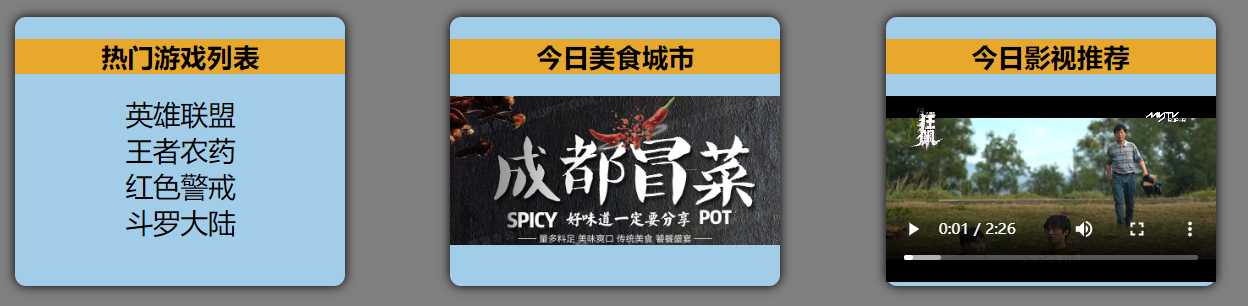
默认插槽
父组件
<template>
  <div class="father">
    <h3>父组件</h3>
    <div class="content">
      <!--双标签中包含的内容,会出现在子组件slot指定的位置-->
      <Category title="热门游戏列表">
        <ul>
          <li v-for="g in games" :key="g.id">{{ g.name }}</li>
        </ul>
      </Category>
      <Category title="今日美食城市">
        <img :src="imgUrl" alt="">
      </Category>
      <Category title="今日影视推荐">
        <video :src="videoUrl" controls></video>
      </Category>
    </div>
  </div>
</template>

<script setup lang="ts" name="Father">
  import Category from './Category.vue'
  import { ref,reactive } from "vue";

  let games = reactive([
    {id:'asgytdfats01',name:'英雄联盟'},
    {id:'asgytdfats02',name:'王者农药'},
    {id:'asgytdfats03',name:'红色警戒'},
    {id:'asgytdfats04',name:'斗罗大陆'}
  ])
  let imgUrl = ref('https://z1.ax1x.com/2023/11/19/piNxLo4.jpg')
  let videoUrl = ref('http://clips.vorwaerts-gmbh.de/big_buck_bunny.mp4')

</script>
子组件
<template>
  <div class="category">
    <h2>{{title}}</h2>
    <!--此处将会展示父组件中指定的内容-->
    <slot>默认内容</slot>
  </div>
</template>

<script setup lang="ts" name="Category">
  defineProps(['title'])
</script>
具名插槽
在子组件中具有多个slot,父组件使用时指定内容要放入哪一个slot。
父组件
<template>
  <div class="father">
    <h3>父组件</h3>
    <div class="content">
      <Category>
        <!--数据将放到插槽s2中-->
        <template v-slot:s2>
          <ul>
            <li v-for="g in games" :key="g.id">{{ g.name }}</li>
          </ul>
        </template>
		<!--数据将放到插槽s1中-->
        <template v-slot:s1>
          <h2>热门游戏列表</h2>
        </template>
      </Category>

      <Category>
        <template v-slot:s2>
          <img :src="imgUrl" alt="">
        </template>
        <template v-slot:s1>
          <h2>今日美食城市</h2>
        </template>
      </Category>

      <Category>
        <template #s2>
          <video video :src="videoUrl" controls></video>
        </template>
        <template #s1>
          <h2>今日影视推荐</h2>
        </template>
      </Category>
    </div>
  </div>
</template>

<script setup lang="ts" name="Father">
  import Category from './Category.vue'
  import { ref,reactive } from "vue";

  let games = reactive([
    {id:'asgytdfats01',name:'英雄联盟'},
    {id:'asgytdfats02',name:'王者农药'},
    {id:'asgytdfats03',name:'红色警戒'},
    {id:'asgytdfats04',name:'斗罗大陆'}
  ])
  let imgUrl = ref('https://z1.ax1x.com/2023/11/19/piNxLo4.jpg')
  let videoUrl = ref('http://clips.vorwaerts-gmbh.de/big_buck_bunny.mp4')

</script>
子组件
<template>
  <div class="category">
    <slot name="s1">默认内容1</slot>
    <slot name="s2">默认内容2</slot>
  </div>
</template>

<script setup lang="ts" name="Category">

</script>
作用域插槽
数据在子组件,但是需要由父组件指定这些数据怎么使用
父组件
<template>
  <div class="father">
    <h3>父组件</h3>
    <div class="content">
      <!--父组件中可以将数据渲染到不同的html结构之上-->
      <Game>
       <!--params中有所有的数据-->
        <template v-slot="params">
          <ul>
            <li v-for="y in params.youxi" :key="y.id">
              {{ y.name }}
            </li>
          </ul>
        </template>
      </Game>

      <Game>
        <template v-slot="params">
          <ol>
            <li v-for="item in params.youxi" :key="item.id">
              {{ item.name }}
            </li>
          </ol>
        </template>
      </Game>

      <Game>
        <template #default="{youxi}">
          <h3 v-for="g in youxi" :key="g.id">{{ g.name }}</h3>
        </template>
      </Game>

    </div>
  </div>
</template>

<script setup lang="ts" name="Father">
  import Game from './Game.vue'
</script>
子组件
<template>
  <div class="game">
    <h2>游戏列表</h2>
    <!--将数据传递给父组件,前面是key,后面是value-->
    <slot :youxi="games" x="哈哈" y="你好"></slot>
  </div>
</template>

<script setup lang="ts" name="Game">
  import {reactive} from 'vue'
  <!--数据在子组件-->
  let games = reactive([
    {id:'asgytdfats01',name:'英雄联盟'},
    {id:'asgytdfats02',name:'王者农药'},
    {id:'asgytdfats03',name:'红色警戒'},
    {id:'asgytdfats04',name:'斗罗大陆'}
  ])
</script>
其它 API
shallowRef 与 shallowReactive
避免了对每一个内部属性做响应式所带来的性能成本,这使得属性的访问变得更快,可提升性能
shallowRef
创建一个响应式数据,但只对顶层属性进行响应式处理,即.value。
let myVar = shallowRef(initialValue);


let person = shallowRef({
		name:'张三',
		age:18
	})
person.value.name = '李四' //不可以修改,因为点了两次
person.value = {name:'tony',age:100}//可以修改,因为只点了一次
shallowReactive
创建一个浅层响应式对象,只会使对象的最顶层属性变成响应式的,对象内部的嵌套属性则不会变成响应式的
const myObj = shallowReactive({ ... });


let car = shallowReactive({
		barnd:'奔驰',
		options:{
			color:'红色',
			engine:'V8'
		}
	})

//只点一次,可以修改
function changeBrand(){
		car.barnd = '宝马'
	}
//点了两次,不可以修改
function changeColor(){
    car.options.color = '紫色'
}
readonly 与 shallowReadonly
readonly
用于创建一个对象的深只读副本。用于创建不可变的状态快照,保护全局状态或配置不被修改。
- 对象的所有嵌套属性都将变为只读。
- 任何尝试修改这个对象的操作都会被阻止(在开发模式下,还会在控制台中发出警告)。
const original = reactive({ ... });
const readOnlyCopy = readonly(original);
shallowReadonly
与 readonly 类似,但只作用于对象的顶层属性。
只将对象的顶层属性设置为只读,对象内部的嵌套属性仍然是可变的。
适用于只需保护对象顶层属性的场景。
const original = reactive({ ... });
const shallowReadOnlyCopy = shallowReadonly(original);
toRaw 与 markRaw
toRaw
用于获取一个响应式对象的原始对象, toRaw 返回的对象不再是响应式的,不会触发视图更新。在需要将响应式对象传递给非 Vue 的库或外部系统时,使用 toRaw 可以确保它们收到的是普通对象
import { reactive,toRaw,markRaw,isReactive } from "vue";

/* toRaw */
// 响应式对象
let person = reactive({name:'tony',age:18})
// 原始对象
let rawPerson = toRaw(person)
markRaw
标记一个对象,使其永远不会变成响应式的。
例如使用
mockjs时,为了防止误把mockjs变为响应式对象,可以使用markRaw去标记mockjs
/* markRaw */
let citys = markRaw([
  {id:'asdda01',name:'北京'},
  {id:'asdda02',name:'上海'},
  {id:'asdda03',name:'天津'},
  {id:'asdda04',name:'重庆'}
])
// 根据原始对象citys去创建响应式对象citys2 —— 创建失败,因为citys被markRaw标记了
let citys2 = reactive(citys)
customRef
作用:创建一个自定义的ref,并对其依赖项跟踪和更新触发进行逻辑控制。使用原生ref,数据更新时同步的,但是使用自定义ref,可以自己在内部实现一些其他的功能
实现防抖效果(useSumRef.ts):
import { customRef } from "vue";

export default function(initValue:string,delay:number){
  // 使用Vue提供的customRef定义响应式数据
  let timer:number
  // track(跟踪)、trigger(触发)
  let msg = customRef((track,trigger)=>{
    return {
      // get何时调用?—— msg被读取时
      get(){
        track() //告诉Vue数据msg很重要,你要对msg进行持续关注,一旦msg变化就去更新
        return initValue
      },
      // set何时调用?—— msg被修改时
      set(value){
        clearTimeout(timer)
        timer = setTimeout(() => {
          initValue = value
          trigger() //通知Vue一下数据msg变化了,然后就会重新调用get方法
        }, delay);
      }
    }
  })
  return {msg}
}
组件中使用:
// 使用useMsgRef来定义一个响应式数据且有延迟效果
let {msg} = useMsgRef('你好',2000)

//模板中用的是msg
<h2>{{ msg }}</h2>
Vue3新组件
Teleport(传送)
将我们的组件html结构移动到指定位置的技术。
<!--弹窗弹出来到to指向的容器下,成为其的子元素,可以写选择器#app、.app等-->
<teleport to='body' >
    <div class="modal" v-show="isShow">
      <h2>我是一个弹窗</h2>
      <p>我是弹窗中的一些内容</p>
      <button @click="isShow = false">关闭弹窗</button>
    </div>
</teleport>
Suspense
等待异步组件时渲染一些额外内容,让应用有更好的用户体验 ,当子组件有异步请求时使用。
- 异步引入组件
- 使用
Suspense包裹组件,并配置好default与fallback
import {Suspense} from 'vue'

<template>
    <div class="app">
        <h3>我是App组件</h3>
        <Suspense>
           <!--要展示的内容-->
          <template v-slot:default>
            <Child/>
          </template>
		  <!--要展示的类容未返回时使用-->
          <template v-slot:fallback>
            <h3>加载中.......</h3>
          </template>
        </Suspense>
    </div>
</template>
全局API转移到应用对象
app.component:注册全局组件ts//在main.ts文件中,将组件引入并注册,即可成为全局组件,随意使用 import Hello from './Hello.vue' app.component('Hello',Hello)app.config:添加全局配置ts//全局都可以使用x app.config.globalProperties.x = 99 //申明x,使ts不会报错 declare module 'vue' { interface ComponentCustomProperties { x:number } }app.directive:注册全局指令tsapp.directive('beauty',(element,{value})=>{ element.innerText += value element.style.color = 'green' element.style.backgroundColor = 'yellow' }) <h4 v-beauty="sum">好开心</h4>app.mount:挂载app.unmount:卸载app.use:安装插件